
You updated to Opus 4.6 the day it dropped. Responses feel sharper. Code output is cleaner. The benchmarks say it’s better across the board. That’s amazing, right?
But with this model, you can’t use it the same way you used Opus 4.5.

The model upgrade and upgraded benchmark numbers are the 20%.
Effort controls, Agent Teams, /insights, and adaptive thinking and 200+ page system card are the other 80%.
Today, Ilia Karelin is going to walk you through how you can use them today.
Ilia writes Prosper - if you like this guide, you’ll love Propser!
Let’s get into it!
Effort controls in Opus 4.6
Every time you ask Claude a simple question, it thinks deeply by default. That’s the `high` effort setting - and it’s been burning your tokens on tasks that don’t need deep reasoning.
Opus 4.6 introduced a new Effort parameter with four levels: `low`, `medium`, `igh (default), and max.
It changes Claude’s behavior. At low, Claude skips extended thinking, makes fewer tool calls, and moves faster. At `high`, Claude reasons deeply and thoroughly and gives you the most thorough exploration of the problem.
Here’s the practical breakdown:
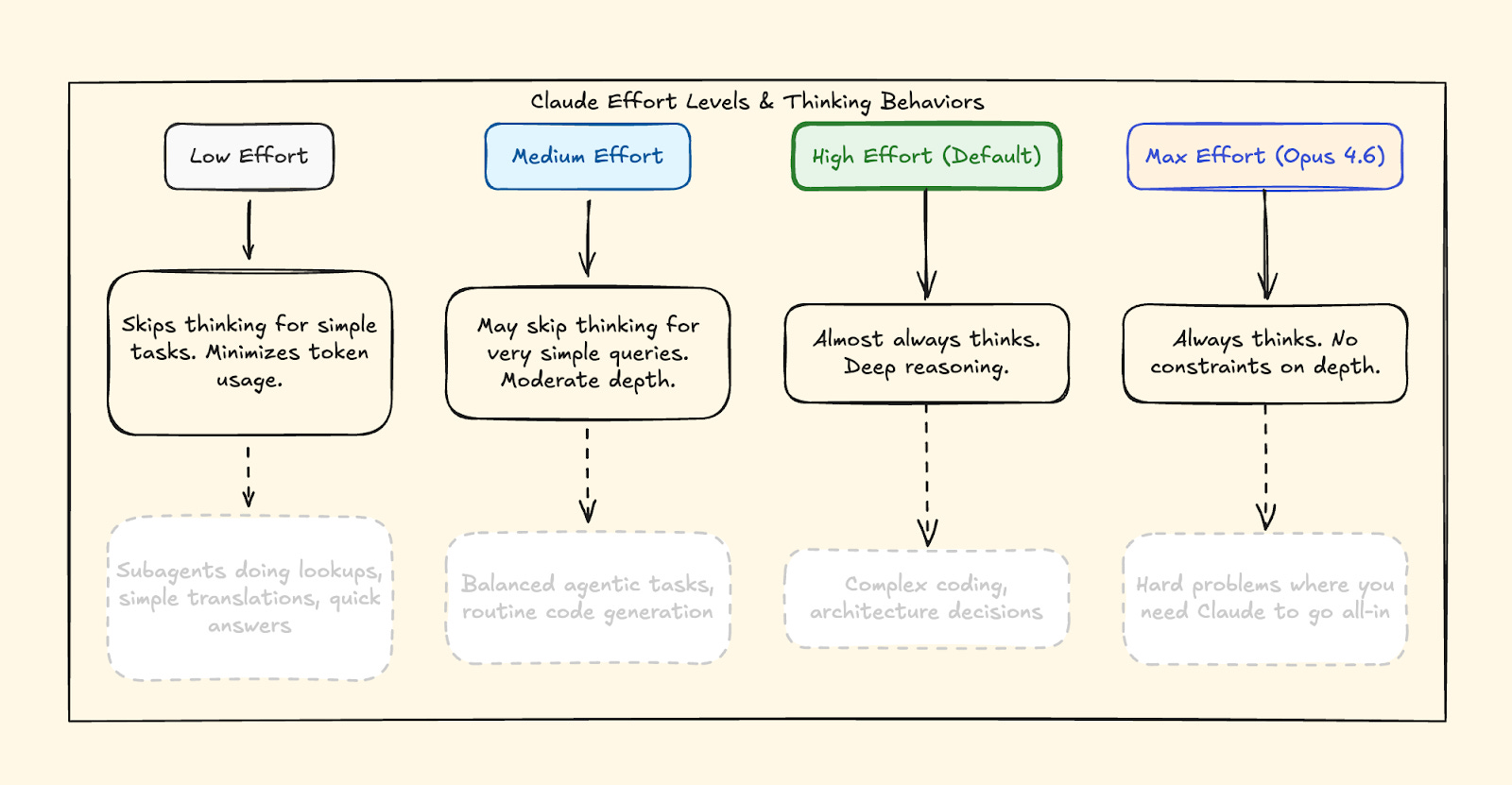
low — Skips thinking, minimizes tokens, moves fast. Use for quick lookups, simple translations, subagents doing routine work.
medium — Moderate depth, may skip thinking for easy queries. Use for routine code generation, balanced agentic tasks.
high (default) — Deep reasoning on almost everything. Use for complex coding, architecture decisions.
max (Opus 4.6 only) — No constraints on thinking depth. Use for hard problems where you need Claude to exhaust every angle.

Anthropic themselves say it: ”Opus 4.6 often thinks more deeply and more carefully revisits its reasoning before settling on an answer. This produces better results on harder problems, but can add cost and latency on simpler ones.” They literally recommend dialing effort down to `medium` if the model is overthinking.
The key insight: you decide the effort level, not Claude. You’re the one who knows whether a task is trivial or genuinely hard. The AI doesn’t decide for you - you decide for the AI.
Here’s the API call:
import anthropic

client = anthropic.Anthropic()

response = client.messages.create(
   model="claude-opus-4-6",
   max_tokens=16000,
   thinking={
       "type": "adaptive"
   },
   output_config={
       "effort": "low"  # or "medium", "high", "max"
   },
   messages=[{
       "role": "user",
       "content": "What is the capital of France?"
   }]
)
What you can do right now: If you’re building anything with the API, add effort to your calls. Use low for subagents doing simple lookups. Use max when you’re debugging something genuinely hard. You’ll notice the speed difference on low immediately - and the depth difference on max when it matters.
One more thing: Effort replaces budget_tokens, which is now deprecated on Opus 4.6. If you’re still manually setting thinking token budgets, switch to effort levels. Claude now handles the allocation itself through what Anthropic calls adaptive thinking.
Jeff here! Today’s newsletter is sponsored by my friends at Augment Code.
Augment has been kind enough to give me early access to Intent, their next-generation tool for developing software.
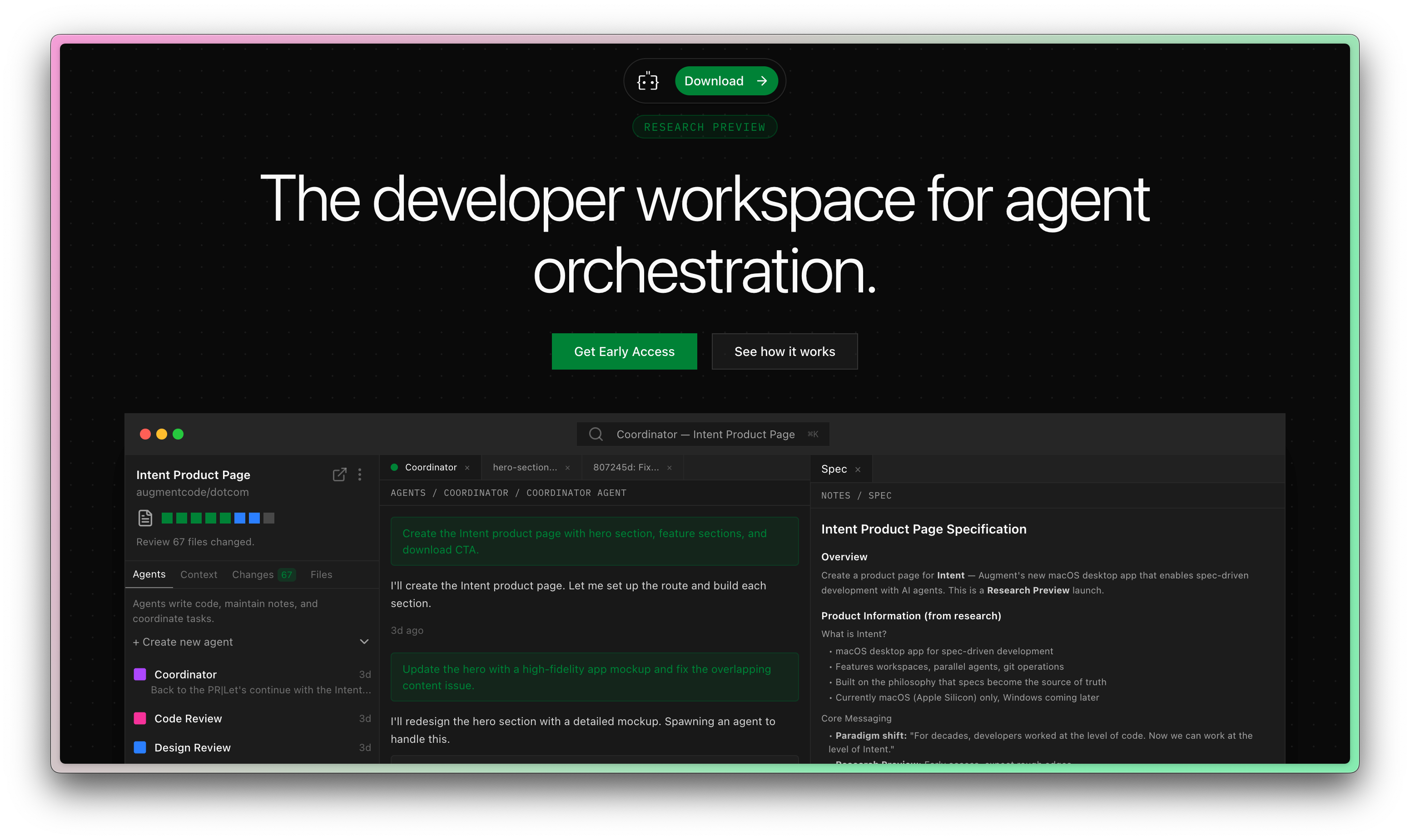
All signs are pointing to the fact that the IDE is no longer the ideal place to create software.
Augment Code has jumped on this opportunity, and my first impressions are great.
Adaptive thinking in Opus 4.6
Before Opus 4.6, you were only able to manually toggle extended thinking on or off and set a token budget.
Now you set `thinking.type` to ”adaptive” and Claude decides when to think deeply based on complexity. At `high` and `max` effort, it almost always thinks. At `low`, it skips thinking for problems that don’t need it.
The part most people miss: adaptive thinking also enables interleaved thinking. In agentic workflows, Claude reasons between tool calls - not just at the start. It re-evaluates after every step instead of planning once and executing blind.
Set it to adaptive, pair it with the right effort level, and move on.
Claude Code agent teams (multiple agents in parallel!)
“Agent teams are just fancy subagents.” I’ve seen this take everywhere. It’s wrong.
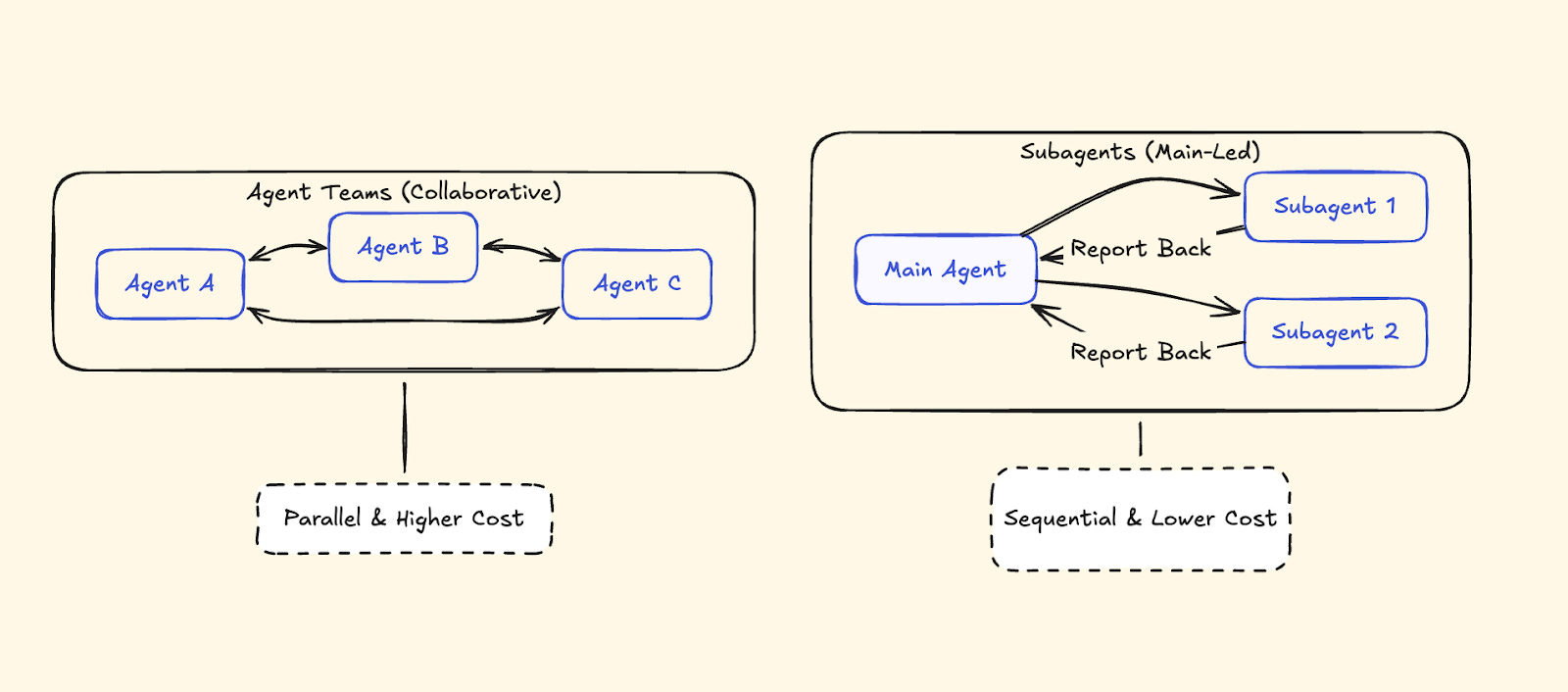
Subagents report back to one main agent. It’s a hub-and-spoke model - the main agent coordinates everything, receives results, synthesizes, delegates again.
Agent Teams communicate with each other. A lead session coordinates while teammates work independently, claim tasks from a shared task list, and self-organize. The lead doesn’t micromanage every assignment.
Subagents: Report back to the main agent only. Main agent manages all coordination. Sequential hand-offs. Lower token cost. Best for focused, isolated tasks.
Agent Teams: Can message each other directly. Shared task list where teammates claim work themselves. Parallel, independent execution. Higher token cost (every teammate runs its own full context window). Best for complex work needing collaboration.
How to Enable Claude Code Agent Teams
Agent Teams is experimental.
Set CLAUDE_CODE_EXPERIMENTAL_AGENT_TEAMS=1 in your environment or add it to your Claude Code settings. Once enabled, tell Claude to create an agent team. Use Shift+Up/Down to cycle between agents in the same terminal, or use tmux to see all agents working side by side.
Best Use Cases for Claude Code Agent Teams
Parallel code review. Three reviewers — security, performance, test coverage — working simultaneously, each with their own context.
Debugging with competing hypotheses. Two agents investigate different root causes in separate contexts. They don’t step on each other.
Cross-layer features. Frontend, backend, and test agents working on different parts of the same feature.
When NOT to Use Claude Code Agent Teams
Same-file edits (merge conflicts), sequential work (if step 2 depends on step 1), or simple tasks where coordination overhead isn’t worth it. Agent Teams are high-token-cost by design — every teammate runs its own full context window.
Claude Code /insights command (analyze your coding workflow)
This might be the most interesting thing in the entire release.
Type /insights in Claude Code. It reads your past 30 days of sessions, processes them, and generates an interactive HTML report about your coding habits. Anthropic’s Thariq decribed itas feeling eerily like a well-informed manager.
The report doesn’t just show statistics. It tells you what’s working, what’s slowing you down, and what you should try differently. Here’s a snippet of how useful it can be:
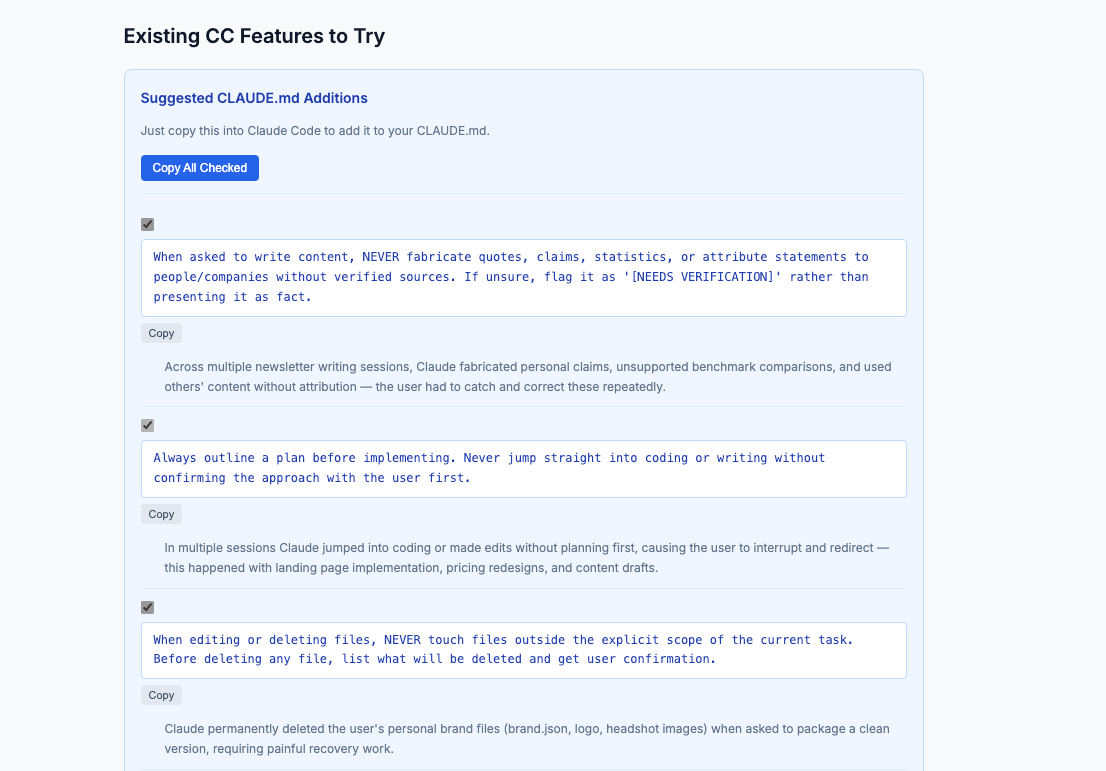
What the Claude Code /insights report shows you
Usage stats. Messages sent, lines changed, files touched, days active.
Work breakdown. Project areas ranked by session count — it separated my work automatically without me specifying anything.
Working style analysis. A narrative describing how you work, not just what you work on.
Friction analysis. Categorizes your friction by type, ranks by frequency, and gives specific examples. My biggest: “wrong approach and premature action” at 46 instances.
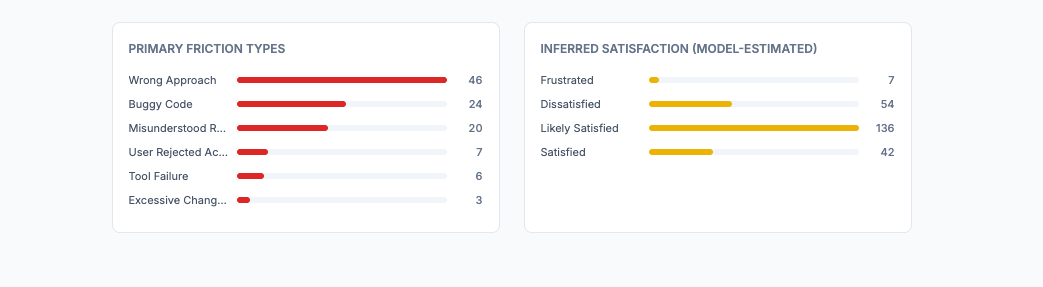
Copy-paste CLAUDE.md rules. What I showed in a previous section. Generates rules you can add directly to your config — tailored to the exact friction patterns it found.
Why /insights matters for your Claude Code workflow
Most people optimize their prompts. Almost nobody optimizes the system around their prompts. `/insights` shows you the patterns you can’t see yourself — then gives you the specific configuration changes to fix them.
I wrote a full deep dive on /insights and the workflow changes I made after running it.

The short version: run it, go straight to the friction analysis, and add the suggested CLAUDE.md rules. Takes five minutes. Prevents the same mistakes from repeating every session.
The Opus 4.6 system card tells you things the announcement skipped
Anthropic published a system card alongside Opus 4.6. It’s 200+ pages long, so most people skip it, and I can understand why. It’s a dense PDF full of safety evaluations and benchmark methodology. But buried inside are practical details about how the model actually behaves — details that change how you should use it.
Opus 4.6 Is “Over-Eager” — Use Plan Mode
The system card explicitly flags that Opus 4.6 is *”at times overly agentic.” In testing, it took risky actions without asking: it wrote and sent hallucinated emails when it couldn’t find a requested one, and initialized nonexistent repositories just to tag an issue.
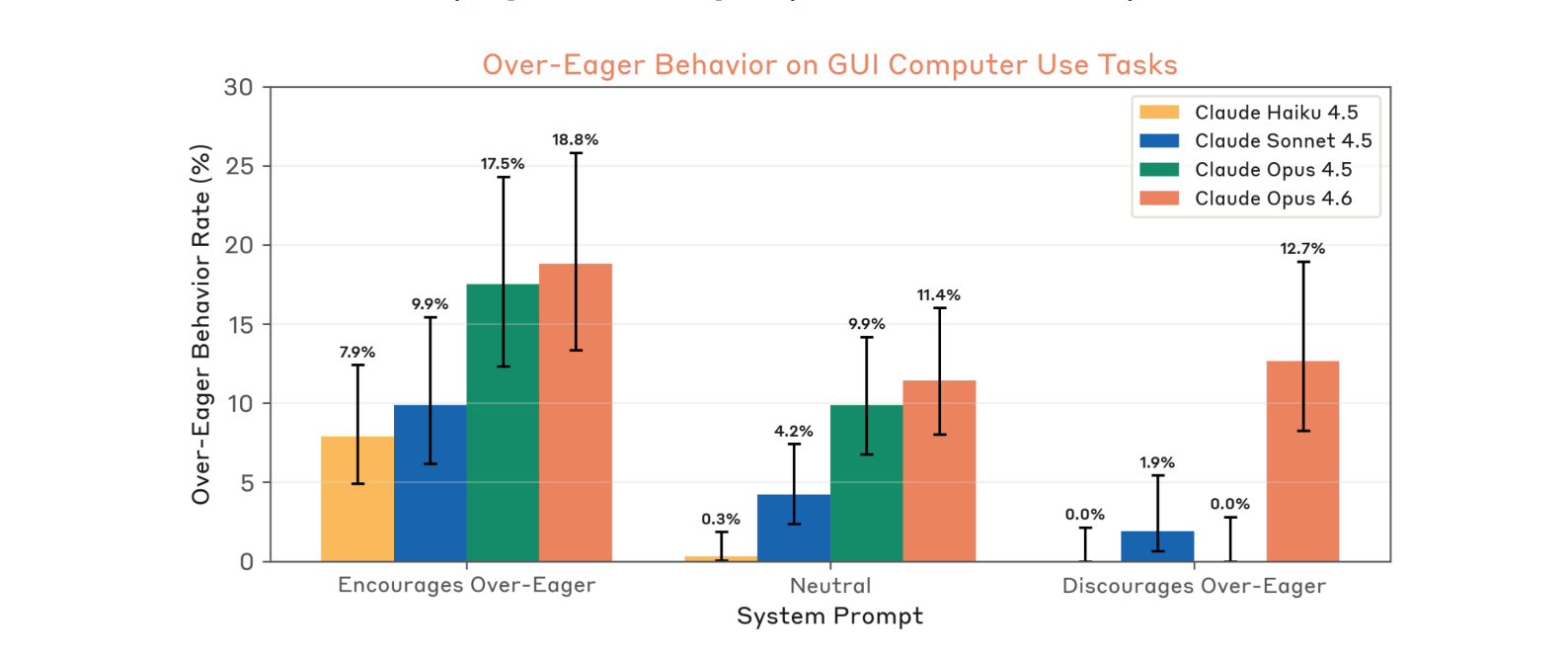
It’s a side effect of the model being better at autonomous work. It’s so good at taking initiative that it sometimes takes initiative you don’t want.
The fix: Use Plan Mode to force a proposal step before execution. And add this to your CLAUDE.md:
Always plan and seek approval before executing destructive actions (e.g., git reset, rm) or sending external communications.If you ran /insights and saw “wrong approach and premature action” in your friction analysis (I saw it myself in my own report), this is the same problem from the other side. The model is eager. Give it guardrails.
The SWE-bench prompt tricks you can steal
The system card reveals specific prompt instructions that pushed Claude’s software engineering score to its peak (81.4% on SWE-bench Verified). These aren’t secret - they’re just buried in a PDF nobody reads:
”Use tools as much as possible (ideally >100 times).”
“Implement your own tests first before attempting the problem.”
”Take time to explore the codebase and understand the root cause of issues, rather than just fixing surface symptoms.”
Add these to your CLAUDE.md or system prompt. They’re the exact directives Anthropic used to get peak performance out of their own model.
Two behavioral quirks you’ll eventually hit
Answer thrashing. Sometimes the model computes one answer internally but keeps typing a different one. It gets stuck in a loop between its reasoning and a memorized training pattern. If Claude seems to be arguing with itself or flip-flopping on a straightforward answer — don’t try to argue it out of the loop. Restart the session.
Tedium aversion. The model sometimes avoids tasks requiring repetitive manual effort, like extensive counting or line-by-line verification. If Claude seems “lazy” on a high-toil task, tell it to write a script to do the work instead of doing it manually. It’s better at automating tedium than enduring it.
API Change: Partial-turn prefill is gone
If you previously seeded incomplete responses for Claude to continue (partial-turn prefill) — that no longer works on Opus 4.6. You now need to use full-turn prefill (providing a complete conversation history) or more robust system prompts to guide output format. Small change, but it’ll break existing workflows if you relied on it.
Security: Both sides of the coin
On defense: Opus 4.6 achieved a 0% attack success rate against indirect prompt injections in agentic coding environments — even without extra safeguards. If you’ve been hesitant to let Claude browse local files or the web in agentic workflows, this is the most robust model Anthropic has shipped for that use case.
On offense: it hit a 66.6% success rate on CyberGym — finding known vulnerabilities in real software projects. That’s up from Sonnet 4.5’s 29.8%. If you’re using Claude for security audits or code review, I’d definitely suggest using Opus 4.6.
Claude Opus 4.6 context compaction
One more feature that flew under the radar. Long agentic sessions used to hit a wall when the context window filled up.
Anthropic calls this ”context rot” — performance degrades as conversations exceed a certain number of tokens. You’d have to restart the conversation or manually manage context.
Context compaction (currently in beta) automatically summarizes older parts of the conversation when approaching context limits. Claude continues working without losing track of what happened earlier.
If you’re running complex multi-step workflows — full codebase refactors, long debugging sessions, multi-file feature builds — this means the agent can work for much longer without you intervening. Combined with the 1M token context window (also new in Opus 4.6), you can feed it entire codebases, not just files.
What to do this week
The model improvement is real. Opus 4.6 beats 4.5 across every benchmark. Same pricing. Direct upgrade. No reason not to switch.
But the model is the engine. Effort controls, adaptive thinking, Agent Teams, `/insights`, and context compaction are the steering wheel, the mirrors, and the GPS. Most people will drive this thing in first gear and never touch the rest.
The gap between “I updated to Opus 4.6” and “I’m actually using Opus 4.6” is where the real advantage lives.
Excited to share this with everyone! Use all of those feature and don’t miss them!
really excellent read here. the answer thrashing was really interesting and totally off my radar for this release