
There’s no shortage of AI coding tools right now. Claude Code, Codex, Cursor, and a growing number of smaller projects are competing to become the default way developers interact with their code.
But I’ve always found OpenCode particularly interesting because of its flexibility. It’s open source, supports models from competing providers, and gives developers considerable control over how their agents operate.
OpenCode 2.0 takes that flexibility quite a bit further.
The biggest changes aren't necessarily the ones you'll notice while chatting with an agent in your terminal. OpenCode has substantially reworked its architecture, plugin system, APIs, and SDKs. It's becoming easier to build software around OpenCode, rather than simply using it to build software.
I went through the new documentation, migration guides, and integration APIs to understand what actually changed. Here's what I think developers should pay attention to.
What's new in OpenCode 2.0? The short version
OpenCode 2.0 introduces a more capable client-server architecture, redesigned plugin APIs, a new TypeScript client, and an embeddable SDK that lets developers run OpenCode inside their own applications.
It also adds more explicit permission configuration, improves the experience of managing sessions across clients, and supports hosting OpenCode on infrastructure such as Cloudflare Durable Objects.
Here’s how the major changes affect developers:
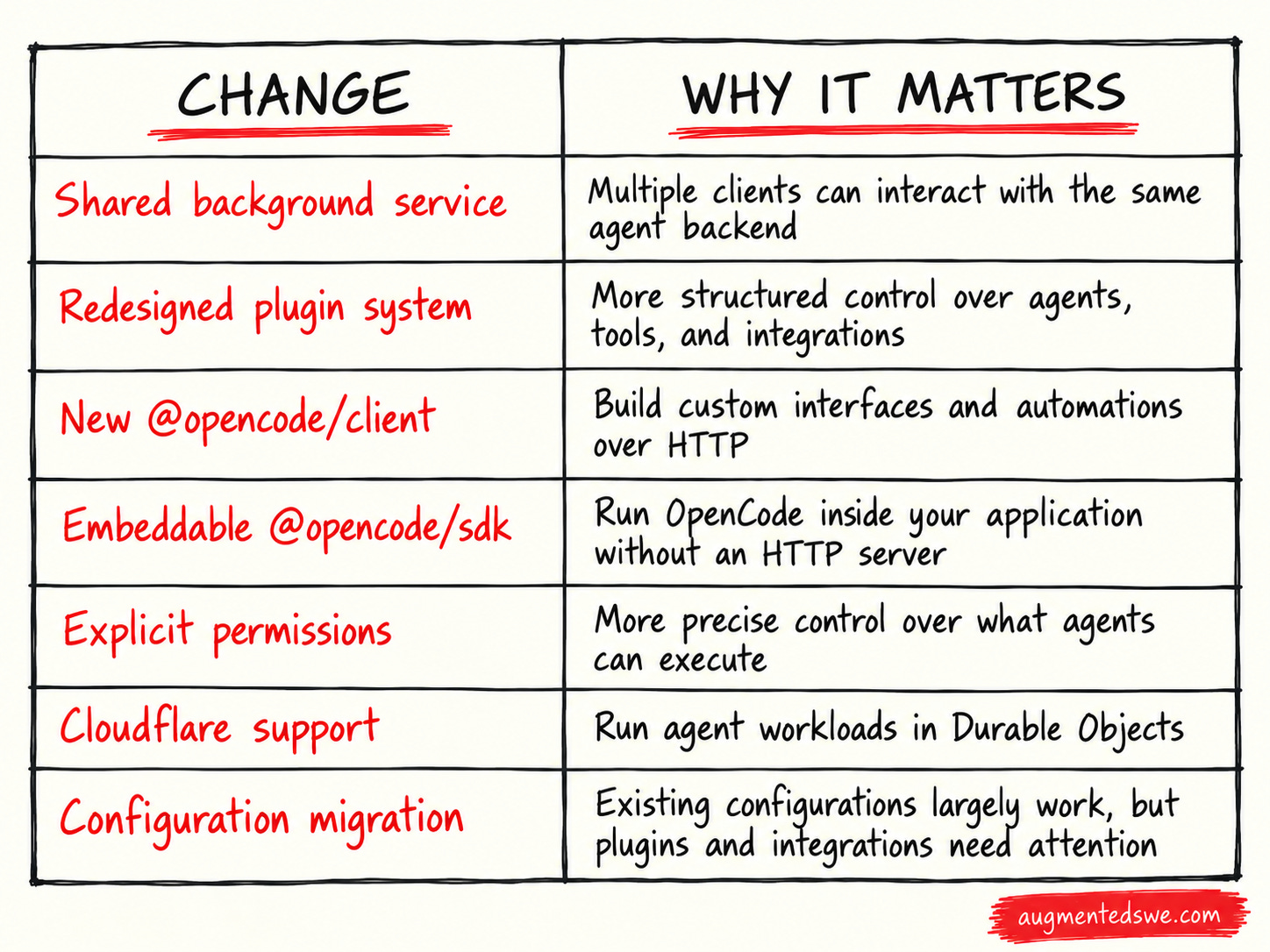
Now, I’ll walk you through each thing that matters.
1. OpenCode now has a more useful client-server architecture
One of the most significant changes in OpenCode 2.0 is how the application separates its clients from the underlying agent runtime.
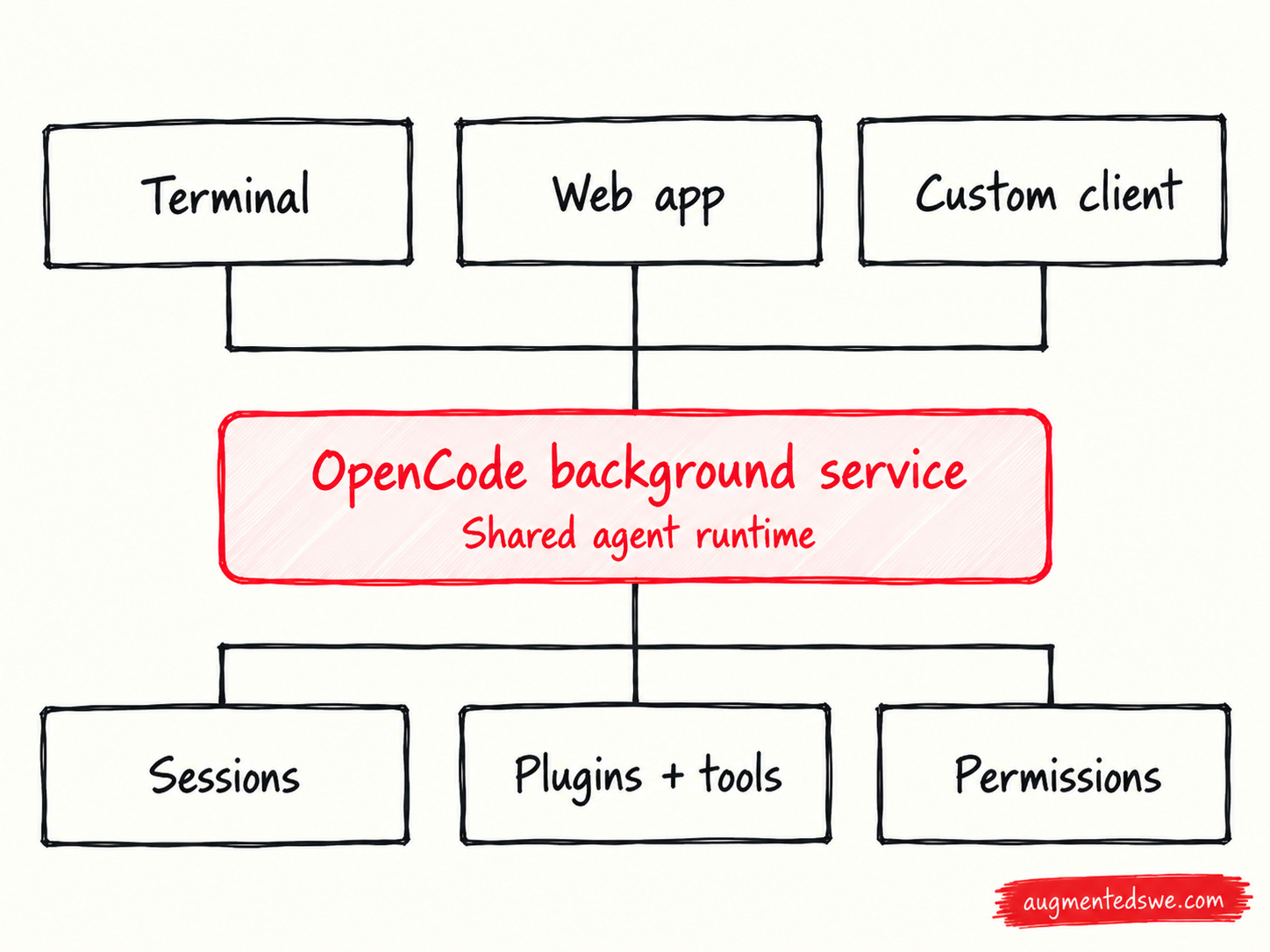
OpenCode 1 already had a client-server architecture, but it typically started a server alongside the terminal interface. OpenCode 2 makes a shared background service a more central part of the experience.
The server owns things like sessions, plugins, permissions, and application state. Clients connect to that service rather than each needing to independently manage the agent runtime.
That means the terminal UI, custom clients, and other integrations can operate against the same backend.
Why should you care?
Imagine starting an agent from your terminal to investigate a production issue, switching to a browser interface to review its progress, and then using your own application to inspect the session’s results.
A shared backend makes that sort of workflow easier to troubleshoot. The documentation even explains how to capture CPU profiles and heap snapshots when diagnosing problems with the agent runtime.
That’s the sort of functionality I appreciate as a backend engineer. Agent tools are becoming part of our development infrastructure, and it’s useful when they expose familiar operational controls.
I probably won’t ever need this, but it’s great that open-source is making it possible at all.
If you’re curious about customizing coding agents, you’re obviously in the right spot. I spend dozens of hours researching each of these guides so you have a shortcut to building software with AI.
I’d love to have you join us and get notified when we share more tutorials like this.
2. The new plugin system makes OpenCode more extensible
OpenCode 2.0 completely redesigns its plugin API.
In V1, plugins generally exported a function that returned an object containing hooks and tools. In V2, plugins define a named extension and register behavior through a structured context.
Instead of maintaining a fork of your coding agent, you can use plugins to customize the functionality you need. You might want custom tools for querying internal logs, an agent configured specifically for code reviews, or integrations with your team’s engineering systems.
The new API is designed to support those sorts of extensions while leaving the underlying OpenCode implementation intact.
Important migration warning: V1 plugin implementations are not compatible with V2. Renaming the plugin directory or updating the configuration isn't enough. You'll need to port the plugin code to the new API.
3. You can embed OpenCode directly into your own applications
This might be my favorite addition.
OpenCode 2.0 has a new @opencode/sdk package that allows developers to run the OpenCode agent runtime directly inside another application.
And I don’t mean spawning the CLI with a subprocess and parsing its output.
The embedded SDK initializes an OpenCode host inside your application and routes API calls internally, without opening an HTTP listener or requiring a separate network.
This opens up some possibilities that go well beyond replacing your IDE.
Imagine building a tool that monitors incoming bug reports and launches a coding agent to reproduce and investigate them. Or a service that spins up an agent to analyze a failed CI build and report its findings directly into your existing engineering workflow.
Instead of implementing your own agent orchestration logic from scratch, you can build on the same runtime powering OpenCode itself.
The SDK supports session management, event streams, plugins, and worktrees. It also handles resource cleanup through explicit host ownership.
4. There's a separate TypeScript client for connecting to OpenCode
Not every application needs to embed an entire agent runtime.
If you already have an OpenCode server running, the new @opencode/client package provides a typed JavaScript and TypeScript interface for interacting with it over HTTP.
The client supports authentication headers, cancellation, event subscriptions, and typed plugin RPC calls.
The distinction between the typescript client and embedded SDK is:
Use
@opencode/clientwhen connecting to an existing server.Use
@opencode/sdkwhen you want to host the agent runtime inside your application.
5. Permissions are more explicit, which is great for agent safety
OpenCode 2.0 also changes how developers configure permissions.
The new configuration uses an ordered array of rules, with each rule describing an action, resource, and effect.
For example, suppose you want an agent to inspect a repository and run routine Git commands, but you don’t want it pushing changes to a remote repository without your involvement.
When an agent is running locally and you're watching it work, permissions are relatively easy to reason about. But when you begin automating agents or invoking them from other applications, explicitly defining what they can and cannot do becomes much more important.
6. OpenCode can now run inside Cloudflare Durable Objects
Here’s one of the more interesting developments I found outside OpenCode’s core migration notes.
Cloudflare announced support for running OpenCode 2.0 through its Agents SDK on October 12.
The integration uses an experimental OpenCodeHarness, allowing developers to run OpenCode inside a Cloudflare Durable Object with SQLite-backed session storage and lifecycle mechanisms for recovering interrupted work.
It's early, and I wouldn't assume you can lift an arbitrary local coding workflow into Cloudflare unchanged. The Workerd runtime does not provide the same filesystem and process capabilities as your development machine. Your agent's tools and execution environment still need to accommodate those constraints.
But this is an encouraging direction for the ecosystem. We're getting more options for running agents as pieces of infrastructure, rather than as processes that require a developer's laptop.
What to know before upgrading to OpenCode 2.0
The good news is that most existing OpenCode users shouldn’t have to rebuild their setup from scratch.
OpenCode 2 retains compatibility with supported V1 configuration fields and continues to read the familiar global and project configuration files. Your existing agents, commands, skills, and MCP configuration should generally keep working.
The biggest compatibility concerns are plugins, applications using the old server API, and terminal-specific configuration.
A few things worth knowing:
Plugins need migration. Existing V1 plugin implementations won’t run unchanged.
The server API changed. Applications using the old SDK or HTTP contracts must be updated.
Terminal settings moved. OpenCode now uses a global
~/.config/opencode/cli.json, with supported settings automatically migrated.Native V2 configuration is optional. You can migrate incrementally rather than rewriting your entire configuration.
V1 and V2 share configuration locations. Keep a backup if you’re maintaining both versions.
AI coding tools are increasingly becoming platforms. We’re seeing more investment in SDKs, programmable APIs, plugin ecosystems, and infrastructure for long-running agent workflows.
OpenCode 2.0 fits squarely into that trend.
I don’t think every software engineer needs to start building their own agent infrastructure. But I’m glad we’re getting open-source tools that make it possible, especially tools that don’t tie developers to a single model provider.