Claude Code vs Cursor
Understand the differences between Claude Code vs Cursor, and learn how to choose between them
Developers today have an unprecedented choice of AI coding assistants, and two standout options are Claude Code and Cursor.
Both tools aim to accelerate software development with AI, but they differ significantly in vision, workflow, and features. This newsletter has a ton of content showing you how to build incredible software with both tools, but we’ve never quite compared them side by side.
This comparison will dig into Claude Code vs Cursor, highlighting how each works, their key capabilities, and when to choose one over the other. You’ll also see how you can use each tool to add a feature to a production application, so you can get a feel for which is best-suited for you.
What is Claude Code?
Claude Code is Anthropic’s AI-powered coding tool that operates entirely in the terminal. It’s described as an “agentic coding assistant” living in your CLI, capable of understanding your whole codebase and performing coding tasks via natural language commands. It’s geared quite heavily towards software engineers, though many less-technical folks are loving the tool.
In practice, you can open a project directory and simply type claude to start instructing it. There’s no GUI. Claude Code meets you in the shell where you already work.
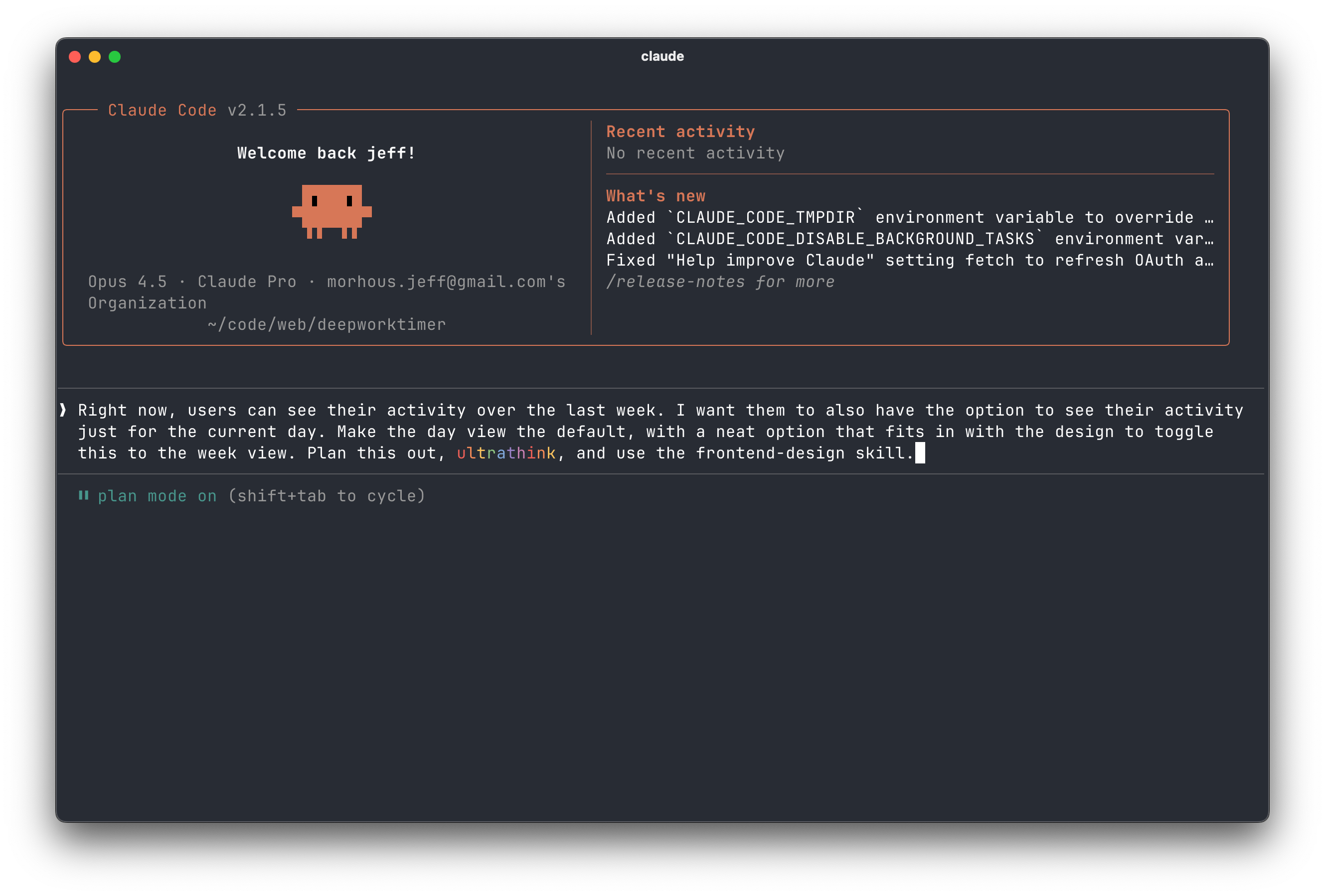
It will make plans, write or modify code across files, run tests, and even commit changes based on high-level instructions.
Anthropic’s powerful Claude models like Opus 4.5 are usually on the bleeding edge of benchmarks that measure AI’s competence at writing software. So you should feel comfortable that they drive the tool, giving it a huge context window (up to 200K tokens or more on some plans) and strong reasoning ability. In Cursor, you’ll have the same context window and reasoning, so this isn’t unique to the Claude Code harness.
Claude Code acts like an autonomous coding agent in your terminal. There’s no emphasis on writing code yourself. You describe what you want, and it takes the wheel to implement it.
What is Cursor?
Cursor, on the other hand, is both a coding agent and an editor. It’s based on the familiar VS Code interface, so it will feel very familiar if you’re already a VS Code user.
Think of Cursor as a specialized code editor with AI built in at its core. It presents a full GUI environment with a file tree, code editor, etc. It’s just like a standard lightweight IDE, but enriched with AI chat and autocomplete features.
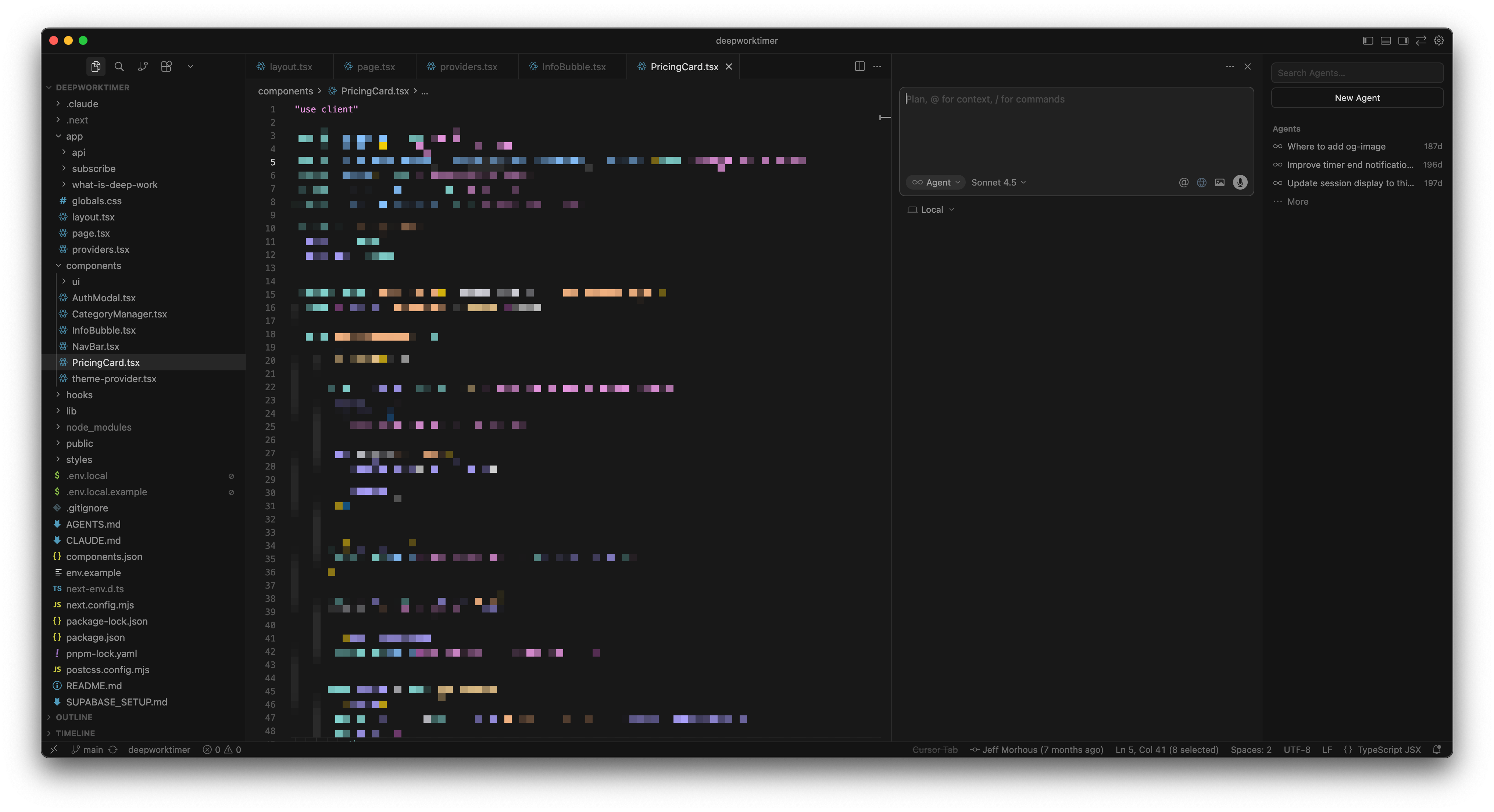
Cursor lets you write code normally while offering inline code generation, intelligent autocompletion, and a full coding agent you can take advantage of.
The Cursor agent also has super interesting custom harnessing around whatever model choice you make, like indexing your entire codebase to do semantic searches.
It can answer questions about your codebase, suggest refactors, and even handle multi-file edits via an agent mode, all without leaving the editor. Cursor integrates with developer workflows through features like “Cursor Rules” (to inject project-specific context), a Slack bot, and a GitHub PR reviewer called Bugbot.
It supports various AI models (OpenAI GPT-4/GPT-5, Anthropic Claude, etc.) behind the scenes, but wraps them in a polished IDE experience. In essence, Cursor serves as “The AI Code Editor”. It’s an environment where AI assists you at every step, but you remain in control of the coding process.
Building a feature in Claude Code
Claude Code is a great tool for building. For example, we have a Deep Work Timer application that needs a new feature.
Subscribers to the newsletter have already seen a detailed guide on how we used Claude Code to add a feature to this app, but we’ll cover it in brief here.
Good sessions in Claude Code start out in Plan mode. In Plan mode, you can describe the end state of what you want to Claude in plain English.
Right now, users can see their activity over the last week. I want them to also have the option to see their activity just for the current day. Make the day view the default, with a neat option that fits in with the design to toggle this to the week view. Plan this out, ultrathink, and use the frontend-design skill.Claude will do some initial reasoning, index your codebase (if it hasn’t already), and then ask some back-and-forth clarifying questions about the feature if anything isn’t clear.
When it thinks it has enough info, it’ll present you the plan and ask for permission to kick off implementation.
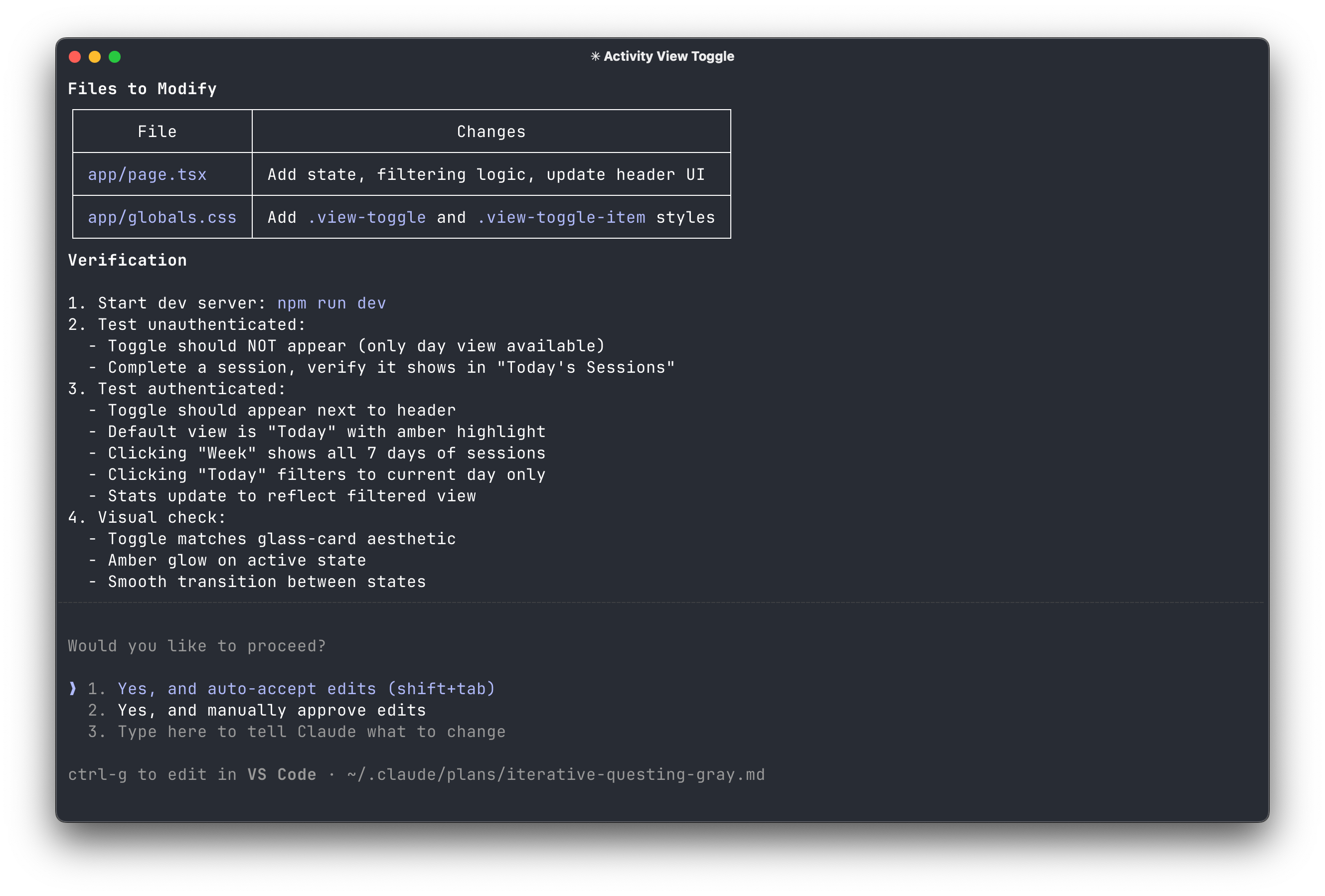
When you let it, it will implement the code needed, testing things as it goes.
Here’s the before and after for this example.
Building a feature in Cursor
Anything you can do in Claude Code, you can also do in Cursor. The workflow does look a lot different! In The AI-Augmented Engineer, we explore best practices for both tools.
We actually mostly built the Deep Work Timer with Cursor:
Let’s say we want to add another feature to our Deep Work Timer.
It would be nice for the user if they could edit or delete a work session from their history.
Cursor has a few different ways of working:
You write code and use autocomplete to move faster
You select code and prompt Cursor to edit or add to it
You use the agent pane to prompt the agent to make changes for you
These options are the core of what makes Cursor different from Claude Code. Cursor assumes that you’ll want some visibility or control into the actual code, which is true of many software engineering tasks.
Cursor’s agent also has a plan mode, but with a much more interactive UI.
You don’t have to use Plan mode, but you almost always get better results with agentic tools this way.
Cursor will then show you the plan, and you can iterate until you’re happy.
Once you’re happy, you can click Build!
One of the major differences in Claude Code vs Cursor is that Cursor keeps you in the loop. It’s very easy for an experienced developer to see the changes, review them, and even insert human thought when needed (without having to swap tools).
Cursor will often open a browser in the editor to validate its own changes!!
Cursor gave a pretty great result after some bug fixing!
Claude Code vs Cursor feature comparison
Both Claude Code and Cursor offer rich feature sets designed to support developer workflows. Let’s break down the most meaningful features of each and how they differ:
Codebase understanding and context
Claude Code is built to deeply understand your entire codebase without explicit guidance on what files to read. Its agent can scan, map, and interpret your project by following import links, searching directories, and reading multiple files as needed.
When executing, Claude Code reads files on demand like a detective, automatically pulling in relevant modules and references needed to complete a task. The upside is comprehensive context awareness. It’s adept at large-scale reasoning across your project.
Anthropic’s docs note that Claude performs “extended reasoning” internally and strips those hidden thought tokens out to keep the context window available for actual code and conversation. In practice, developers find the full 200K token window rarely fully utilized before older context is dropped, but Claude Code still reliably handles big projects without the user micromanaging context.
Cursor’s agent also does work to improve understanding of context. The agent leans on semantic search because grep-based search tools aren’t enough to search a codebase based on meaning.
For larger contexts, Cursor introduced a Max Mode that leverages the full context window of models like Claude or GPT for bigger tasks. With Max Mode, Cursor can tap into 1M token context models (which are not common).
Code generation and autonomy
Claude Code takes a rather autonomous approach to code generation. When you give Claude Code an instruction, it often generates an entire implementation plan and executes it fully.
For example, if you say “Add user authentication with email verification”, Claude Code will likely create all the necessary pieces: routes or API endpoints, database migrations, email-sending logic, and even tests for the new feature. It essentially tries to give you what you asked for, plus everything it thinks you’ll need to make the feature work end-to-end.
This can feel magical: a single command results in multiple files or functions added/modified in one go, potentially saving hours of manual work. Claude Code will also execute and verify, where possible, but Cursor does this well too.
When Claude’s extra initiative is not desired (for example, you wanted a small tweak, but it reformats the whole file), you might have to refine your prompt or make manual edits. Also, because you’re not inserting changes inline yourself, small adjustments require re-prompting.
This means Claude Code is fantastic for big leaps, but can feel clunky for tiny edits.
Cursor, on the other hand, emphasizes a more granular and interactive style of code generation. In Cursor, the default is that you decide the scope and trigger for generation: you can ask for just the next line of code, a function implementation, or a refactoring of a selected block. Cursor then provides exactly that change, often presenting it as a diff that shows what will be removed and added.
You can review the diff and apply it if it looks good, or modify your prompt if not. This approach gives you fine-grained control. It’s very useful for maintaining code quality in critical sections. You see every edit the AI proposes before it goes in. For instance, if you highlight a fragile piece of logic and ask Cursor to optimize it, it will show the suggested new code vs the old code side-by-side, letting you catch if it misunderstood something.
Cursor also excels at on-the-fly code generation when the implementation details are well-defined: its inline autocomplete can finish loops or fill in boilerplate as you type, using the Tab key to accept suggestions. It even understands pseudo-code in comments – e.g., you write “// loop through all pairs in list” and Cursor can generate the actual nested loop code in response. This speeds up the mundane aspects of coding.
Importantly, Cursor sticks to what you ask for. If you ask it to implement one function, it won’t spontaneously edit other files (unless those changes are necessary and you’re in an agent mode explicitly). This makes its behavior more predictable for targeted tasks.
That said, Cursor is not limited to trivial changes. It does have an Agent mode where it can handle larger tasks somewhat autonomously, as shown in the example above. For example, Cursor can accept a request to implement a new feature and break it into a list of subtasks (a to-do list), then execute them one by one, similar to how Claude Code would.
Cursor’s generation is precise and user-directed by default, with the option of agentic behavior when you explicitly invoke it. This makes Cursor feel safer for high-stakes code changes.
Model support
Another notable difference between Claude Code and Cursor is the choice and flexibility of AI models.
Claude Code is powered exclusively by Anthropic’s Claude models. It currently offers variants like Claude Opus 4.5 and Claude Sonnet. These models are known for strong coding abilities and helpful reasoning. However, you won’t be able to use OpenAI’s models or others within Claude Code.
Anthropic has optimized the experience around their own AI. The upside is consistency: all outputs come from Claude, which has a particular style and strength in following multi-step instructions. You don’t have to guess which model is best; the tool defaults to a high-performance model, and you can trust it to handle a wide range of tasks.
Cursor is much more model-agnostic and flexible. It integrates with multiple AI models, effectively giving you a “buffet” of options. Out of the box, paying users can access models like Gemini 3 Pro and GPT-5.2-Codex, as well as Anthropic’s Claude (certain tiers allow choosing Claude models for completions).
In Cursor’s interface, you can usually select which model to use for a given prompt or for the autocompletion engine via a dropdown or settings. This means if one model is not giving good results, you can switch to another on the fly.
For instance, some users might prefer Claude for its longer context or gentler style when asking documentation questions, but switch to GPT-5.2 for complex algorithm generation.
The benefit of model diversity is adaptability and potentially better results on different tasks (plus not being wholly dependent on one AI provider).
Your choice has tradeoffs
Choosing between Claude Code and Cursor comes down to evaluating the tradeoffs in light of your projects and preferences.
My preferences have changed a lot over the last year. I’m probably spending 60% of my time in Claude Code and 40% in Cursor at this point.
Agentic vs control
Claude Code offers a higher degree of agentic workflow. It’s like an AI teammate that you delegate tasks to. This can drastically speed up the execution of complex, multi-step tasks with minimal intervention.
Cursor offers finer control. It’s more like an AI pair programmer constantly by your side. This can make you individually more productive and confident, as you’re still guiding each step of the work.
Depending on whether you need raw speed in small increments or the ability to offload whole projects, your preference may differ.
Vision and workflow fit
If your team values traditional code review, incremental changes, and hands-on development, Cursor fits naturally. It keeps the human in the loop at all times, which aligns well with standard software engineering practices (think commit diffs, code reviews, etc. Cursor’s suggestions come as diffs you can review).
On the other hand, if you’re pushing toward a future where AI handles more of the pipeline automatically, Claude Code is built with that integration and automation mindset. It might require some workflow adjustments (getting comfortable with CLI commands triggering large changes), but it can unlock significant efficiency by automating what used to be manual toil.
Model options
With Claude Code, you get Anthropic’s latest models with huge contexts, which are great for large projects or long conversations with the AI. The output style will be consistent (only one model family). But you won’t get OpenAI’s or other models’ unique advantages.
With Cursor, you can tap into whichever model suits the task (GPT-4/GPT-5 for certain tasks, Claude for others, etc.), and you benefit from whichever breakthroughs come from those providers. However, model performance can vary, and managing them might be an overhead.
For most users, both tools produce high-quality code as long as prompts are clear, so there isn’t a clear right option.
Where to go from here
Once you choose between Claude Code vs Cursor, get some hands-on time with the tool! The AI-Augmented Engineer has plenty of guides on Claude Code as well as walkthroughs for Cursor, so consider subscribing to get a jumpstart on your AI-augmented software development journey.


